We’re proud to announce the availability of WordPress SEO 2.0. This release adds new features for Google’s Knowledge Graph and improves the design, layout & usability of the WordPress SEO plugins admin screens in many ways.
Google Knowledge Graph
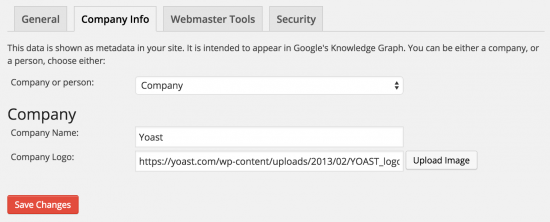
Google recently introduced new features for their knowledge graph, allowing you to highlight yourself in the search results as either a company or a person. This includes you or your company’s name, if your site is for a company, the logo:
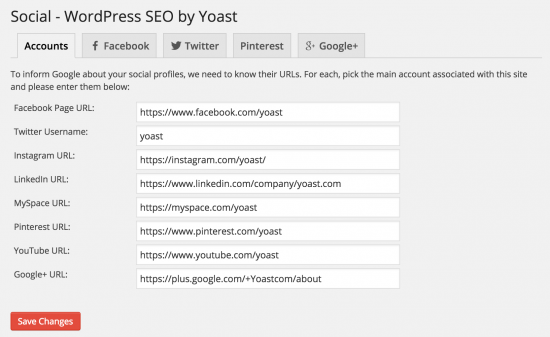
And it includes your social profiles (this is the list of social networks Google supports in their social markup):
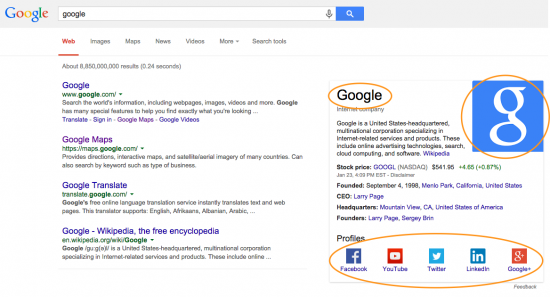
If Google has picked this all up and shows a Knowledge Graph block for you or your company (note that we can’t force it to do that), it would look like this:
Simplified the admin menus
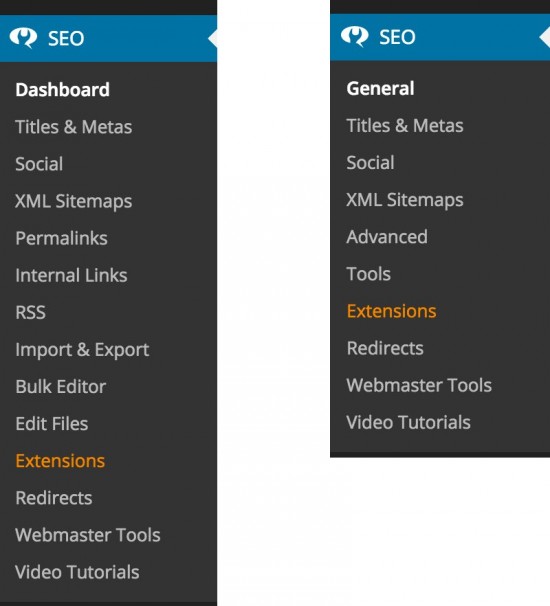
We’ve decided to move several admin pages under one “Advanced” page, and several tools to a new “Tools” page. This makes our entire admin structure a lot cleaner (note the screenshots are for WordPress SEO premium), compare the old (left) versus the new (right):
While this might seem mostly a superficial change, it’s very important in how we think you should perceive our plugin. The most important thing you can do in SEO is write good content; the most important section of the plugin is thus the metabox on the edit post / pages. While the features hidden under the Advanced menu are very useful, they’re not going to make your ranking go from poor to awesome. By moving them all to one advanced page, we hope to make that emphasis more obvious.
WordPress SEO Premium changes
Speed improvement
Not a feature, but a very welcome change: we’ve made WordPress SEO Premium much, much faster in this release. You’ll notice this in the admin of your site almost immediately.
Updated videos
Because we’ve changed all the admin screens, all the videos had to be redone, so in WordPress SEO Premium 2.0 you’ll find a completely new set of 13 videos made by Shawn Hesketh of WP101. This is the first of these 13 videos you’ll get with WordPress SEO Premium:
Version number changes
With this release we’ve also made the version number of WordPress SEO and WordPress SEO premium the same. They’re both called 2.0. We will keep them the same throughout future releases, so we only have to communicate one version number.
Go update!
Go update your WordPress SEO and let us know what you think!
Joost is an internet entrepreneur and the founder of Yoast. He has a long history in WordPress and digital marketing. On our blog, he has written a lot about SEO in general, technical SEO and important topics related to SEO.
June 13 - 15, 2024
Team Yoast is at Attending, Organizing, Sponsoring, Volunteering WordCamp Europe 2024! Click through to see who will be there, what we will do, and more!
See where you can find us next »
23 May 2024
Learn how to start your SEO journey the right way with our free webinar. Get practical tips and answers to all your questions in the live Q&A!
All Yoast SEO webinars »
111 Responses to WordPress SEO 2.0: focus on what matters
Susanne • 9 years ago
Great work. I love Google’s Knowledge Graph but wish they would also link to a companys newsletter.
Linda Allen • 9 years ago
I love to do that i will try it now thanks i was searching for google knowledge graph can i use it personally?
steve • 9 years ago
I love that with Yoast,how you have always kept up with what Google likes and doesn`t like , most seo plug-ins that start out improving seo for you end up being the very cause of your downfall later down the line . Not Yoast . Fair play to the whole team there .
Ratchaphol @SMMTIPS • 9 years ago
Great update Yoast! I’ve been using Yoast for more than 2 years since i entered the world of internet marketing.
:) I’m here to support, a big fan of Yoast SEO!
Chris • 9 years ago
this release was awesome..i love it..best seo plugin ever.. Keep It Up Yoast team
kksilvery • 9 years ago
I think yoast has done the job that blogger and other platforms couldn’t do.
Edward • 9 years ago
Great new features, Yoast!
What is the recommended size for the logo?
sev • 9 years ago
two versions before was working fine, in this version is still messed-up -in posts, every title if one char per line
-like:
H
E
L
L
O
will u fix that ever ??, regardless of supported user or not is a bug…
Sandeep • 9 years ago
Can you add this feature metadata scheme like – something like that in new version?
Bas Holtzer • 9 years ago
I tried to install the plugin on our website, but it generated strange effects in the admin. The screen with your tracking-question pop-ups everywhere and the ‘All pages’-page is completely blank. That’s probably conflicting javascript. We’re using the X-theme from Themeco with some of the X-plugins installed. Do you know of any issues with this theme?
Thanks, Bas
Bas Holtzer • 9 years ago
Just installed the .01-update, but it didn’t solve my problem. Any tips are welcome.
Bas
Bas Holtzer • 9 years ago
Just deactivated some plugins: that did the trick!
Thanks,
Bas
parrainage boursorama • 9 years ago
very nice update ! congrats !
Peter Larsen • 9 years ago
Brilliant update. Everything is nicely compact and the use of tabs for the options just make it cleaner. One problem i found is the rss footer option is gone? I cannot change my previous text which is still showing in my rss feed.
^ Post author
Joost de Valk • 9 years ago
Nope, it’s under Advanced → RSS now :)
Peter Larsen • 9 years ago
Thanks. I spent ages looking but couldn’t find it. :)
David • 9 years ago
Been looking forward to an update – the knowledge graph additions are a nice touch!
David
Beni Iskandar • 9 years ago
Hi brother, something happen when i activated Strip the category base.
I am using 2 level category base like this /tutorial/something.
when i try to access category archive the list of post did not show.
Thanks before, so far this plugin is great for seo and serp optimization (y)
Beni Iskandar • 9 years ago
Oh it fixed now, (y) not 404 again thanks.
sekhar • 9 years ago
Hi yoast team,really you are doing great, I saw so many people are using your plugin.More than 1 1/2 year onwards i am using your plugin,simply superb ..thanks
94% Solution • 9 years ago
yeah , all plugins of yoast team are great
94% Solution • 9 years ago
is there any update for the premuim plugin ?
Matthew Wayne Selznick • 9 years ago
Until the loop issue on the welcome screen is fixed, can you provide a link to the previous version of the premium plugin? Thanks.
Joost de Valk • 9 years ago
Actually, the loop issue seems to be a bug with certain hosts that are caching options to hard. Are you hosted on WP Engine by any chance?
We’ve prepared a workaround so you only get redirected to the welcome screen once every 24 hours that we’ll release on Tuesday, but the issue really seems to be with your host and not in our code…
Humanovation • 9 years ago
I have the same problem … and, only with v2.0 of your premium plugin. There was no problem with the last version of your plugin … therefore, the issue IS with your new code. Putting it on WP Engine is a cop out. However, regardless of where the issue lies, it is ultimately MY problem. So, it either gets fixed or I simply do not renew my premium multisite subscription … simple as that ;-)
Nick Ho • 9 years ago
I have the same issue – I am with siteground.. I am using the free version and I cannot get back to any of my other admin tasks.
How do I get this fixed? – I cannot post or manage my website. It was not happening to the previous version.
Mauro Stupato • 9 years ago
I have the same problem: loop on the welcome screen. I’m hosted on siteground. Can you help me? Give me, at least, the possibility to reinstall previous version. Thanks
Tim Dugan • 9 years ago
Great job on the upgrade – loving the idea of faster speed + knowledge-graph data – thanks Yoast Team!
Claudiu • 9 years ago
Great new features. Nice to see you are keeping up with what search engines demand from websites these days, especially from social media.
Thanks for this update
Doug Smith • 9 years ago
Is there a reason you chose to include the new Google Knowledge graph script in the header rather than down at the end of the page? Always trying to push what I can to the bottom for better page loading performance. Google says it can go in the head or body of the page.
^ Post author
Joost de Valk • 9 years ago
Hi Doug,
I thought about it briefly but to be honest, as there is no external scripts nor any executable code, the tradeoff of having to add more code to output something in the bottom didn’t seem worth it.
Hamid Roshaan • 9 years ago
Whoah! This is a whole bunch of new features especially social ones, I am going to try them now.
Lis • 9 years ago
This is awesome, guys! Seems a bit more intuitive and streamlined, and it’s just in time for my site relaunch. ;) I look forward to seeing it in action – thanks for being my #1 resource.
Barry Myers • 9 years ago
Since I’ve updated, I am getting some issues related to post SEO. The page analysis tab in the post editor is inaccurately reporting and so it is telling me all of my SEO scores are “poor”. Specifically, it is telling me:
–There are 0 words contained in the body copy. This is far too low and should be increased.
–The keyword doesn’t appear in the first paragraph of the copy, make sure the topic is clear immediately.
–No outbound links appear in this page, consider adding some as appropriate.
All of these I know to be inaccurate. ???
^ Post author
Joost de Valk • 9 years ago
Hi Barry,
I don’t think any of these issues are related to this update in particular as we didn’t change anything in that section of the plugin.
Barry Myers • 9 years ago
FYI: it may be relevant to know I’m running the Genesis Framework (also latest version).
Barry Myers • 9 years ago
Do you have any recommendations, then, on where I can begin to dig into this issue? It is still going on. Using the latest versions of WP and SEO plugin.
Zoli Erdos • 9 years ago
Stopped generating Google News Sitemap. First I thought I’d just repeat setup, fill out all fields, hit Save Settings – and voila! all settings cleared out, Enable XML News sitemaps functionality is NOt checked, and in fact it no longer generates the news sitemap
Zoli Erdos • 9 years ago
Just seeing now that my WordPress SEO News plugin is rel 1.1.1 – did not realize it stopped updating. Is that the problem, i.e. it no longer works with 2.0?
Thanks.
^ Post author
Joost de Valk • 9 years ago
Hey Zoli,
if you’re a paying customer, please email our support desk. Our News SEO extension was updated to work with this update of WordPress SEO. It’s current latest version is 2.2.3.
If you hadn’t switched over to the paid version of News SEO; we’ve made that a paid extension about a year ago…
Brice Emry • 9 years ago
You are undoubtedly the best! Well done for the shot work!
Marcus • 9 years ago
Hey Yoast, great work as ever. The knowledgegraph / social elements are awesome. Time to go premium!
Manos • 9 years ago
I just did the update, looks much better, thanks for the update. Can’t wait to see the “company” and “person” changes in action! :)
Irek • 9 years ago
Hi,
After udpate to 2.0 my WooCommerce shop stopped reporting e-commerce data and one of the goals – sales based on the part of the URL.
What is going on???
Is there a chance to move back to previous version untill this bug is fixed?
Rgds Irek
^ Post author
Joost de Valk • 9 years ago
Hey Irek,
I highly doubt this issue is related to our WordPress SEO update. Did you upgrade any other plugins in the process?
Jim • 9 years ago
Works great, except the data in the schema markup is different than what I’ve entered on the Company Info tab. I can’t figure out where this other data is pulled from! Also, the url schema tag doesn’t include https:// so it throws an error in Google’s schema tester.
Jim • 9 years ago
My mistake! Please disregard, I sorted it out :)
^ Post author
Joost de Valk • 9 years ago
Good to hear Jim :)
Joern • 9 years ago
Do we also have to update the sitemap for the Google webmaster tool generated by your plugin, or will the new content being added automatically to the existing sitemap?
Anyhow, powerful update!
Cheers!
Joern
RahulB • 9 years ago
The new update about Google Knowledge Graph is quite interesting. Yoast SEO Plugin is my best SEOplugin from last 3 years.
Thanks
Chris McCarron • 9 years ago
New toys to play with! Thanks guys.
Omar Belkadi • 9 years ago
Nice and very powerful update. Your update spoke mind. Thank you for the efforts.
Regards
Giovanni • 9 years ago
I just upgraded my sites to version 2.0 but on http://www.paolorecchia.it I have this error:
Fatal error: Call to undefined method stdClass :: canonical () in/web/htdocs/www.paolorecchia.it/home/wp-content/plugins/wordpress-seo/inc/wpseo-non-ajax-functions.php on line 235.
I see this error only on firefox, chrome or not on IE
^ Post author
Joost de Valk • 9 years ago
On what URL do you see that error? I don’t see it live on your site now and it looks like the canonical is output fine?
Giovanni • 9 years ago
I see the error only on mozilla firefox, you can see the string at bottom of page. http://www.paolorecchia.it
Tadley Acres • 9 years ago
I love this plugin but it has consistently blocked the ability to add links to my wordpress site for some time. I just updated to v2.0, hoping it would resolve the issue but it still happens.
When i click the hyperlink button, the screen flashes briefly but the pop-up window fails to appear and from this point the page is no longer responsive until I refresh.
I’m running the latest plugin and latest wordpress.
Any ideas?
^ Post author
Joost de Valk • 9 years ago
Hey, you probably have another plugin that clashes with our JavaScript. Are you able to open the JavaScript console and see if there are any errors there?
Craig Riley • 9 years ago
Great update Yoast. always informative and love your plugin. Works the best.
Cheers
Pete • 9 years ago
Love the update for the new features in the knowledge graph, great work (as always)!
Anh Tran • 9 years ago
Glad that you add Knowledge Graph to the plugin. I’ve just tested it and it works nicely. I would love if you can add more info to this feature like contact point and contact person.
Thanks for the great work!
Mukul • 9 years ago
The new plugin is just awesome and i am really grateful to yoast team as yoast has become a really great seo solution for me. But I want to ask you whether it will be possible to install the old pluings backup to the new one.
Deependra Chaudhary • 9 years ago
Thanks for these awesome features in new update! Cheers!!
Lorenzo • 9 years ago
You have increased the speed of the plugin premium because first it was slow compared to the free version , or just buy the premium version I can have a plugin faster ?
^ Post author
Joost de Valk • 9 years ago
The redirects backend in premium was slow. We’re not (and will never) keep performance improvements from going into the free plugin :)
Marco • 9 years ago
Best WordPress SEO-Plugin ever! Thx!
Peter • 9 years ago
Thanx Yoast + team!
Vikas Singh Gusain • 9 years ago
Wow awesome update guys, great feature in Google Knowledge Graph and now I use this. Thanks for sharing this kind update, this update very useful.
Torben Grue • 9 years ago
Excellent update, especially looking forward implementing the social profiles
Joe • 9 years ago
Could you tell me if we are talking about the free and premium edition or only the premium edition.
^ Post author
Joost de Valk • 9 years ago
Hi Joe, I already did in the post, this is for both free and premium :)
Amy Shojai, CABC • 9 years ago
For the “free” version it’s eliminated any ability to post title/meta description on individual blogs. NOT happy! Will roll back to previous version if possible…
Giuseppe Lanzetta • 9 years ago
Great! I’m looking forward to update all the websites I admin
Jan Mareš • 9 years ago
Looks good! Thank you for the update and for this great plugin in general. It’s my favourite.
Nigel Abery • 9 years ago
Knowledge graph feature – did not see that coming. Interesting addition. Thanks guys!
Wedding photographer Milton keynes • 9 years ago
Awesome update… Thanks!
Chad Musgrove • 9 years ago
Awesome updates. Makes me glad I paid for the premium.. :)
Feature Request for Yoast SEO 3.0
Add the ability to change image title and alt tags from the bulk editor.
^ Post author
Joost de Valk • 9 years ago
That’s pretty hard to do as there can be dozens of images in a post.
Travis Pflanz • 9 years ago
Maybe I’m missing something, but I don’t see the Social Media markup being inserted. I don’t see the “sameAs” schema markup when viewing the source. Yes, I’ve cleared cache, etc.
I got it! I missed the new “Your Info” tab in “General Settings”
Jurnal Teknisi • 9 years ago
Realy nice update,,,
Very useful for newbie like me,,
Thanks a lot team,, you the one only for my small web
john • 9 years ago
I’m in that same loop – the welcome screen has taken over and I can’t get into the plugin area to disable this HELP!
Humanovation • 9 years ago
Premium SEO 2.0 not working on my site … seems to be stuck in some kind of loop and I can’t access any of the features ;-(
Matthew Wayne Selznick • 9 years ago
I’m experiencing this problem, too. JUST updated; the plugin is looping on the welcome screen and won’t let me go anywhere else in the WordPress backend.
Humanovation • 9 years ago
I also can’t switch to any of the other admin panels, it keeps instantly switching back to the SEO plugin panel … I’m hosed ;-(
Humanovation • 9 years ago
It won’t deactivate either … I’m going to try to FTP in and just delete the whole plugin folder.
Humanovation • 9 years ago
Deleted the folder via FTP and was able to regain access to my WP backend. Switched to the non-premium version of the plugin until they get it fixed and the non-premium version is generating a sitemap error according to GWT. I think that, for now, the only solution is to roll my entire website back to yesterday’s save point ;-(
Ram Gupta • 9 years ago
I personally think it is an Good feature. Adding company details is too important. Thanks WP SEO 2.0
Jagdish Bhatia • 9 years ago
Thank you Yoast,
I learned many new things in SEO just by using this plugin. Many of pages are placed highest in SERP because of it.
Jagdish Bhatia • 9 years ago
….Many of my pages….
Quentin Moore • 9 years ago
Thanks for the update and thanks for making the best, most important WordPress plugin available!
Brian Jackson • 9 years ago
Wow awesome update guys! I wrote a tutorial on my blog on how people could add social to knowledge graph with Google Tag Manager… Now I will have to update it. Much easier to use Yoast to deploy knowledge graph items :) Time to update all my sites. Kudos!
Ryan Hellyer • 9 years ago
This looks like a good step in the right direction.
Fakhrul Alam • 9 years ago
what a awesome feature, just saw your update on facebook and got chance to read your post.. is this going to come or already available for user..
How it actually works in codes?
Do we have to give it on every page and post?
Kushal Azza • 9 years ago
Google Knowledge graph is totally cool feature. Looking forward for more such awesome updates in future. Yoast Team thanks a lot !
Rana Waqar • 9 years ago
i use types custom post type plugin and i got this error in my feed page. screenshoot http://snag.gy/pY0lh.jpg
This page contains the following errors:
error on line 29 at column 25: Input is not proper UTF-8, indicate encoding !
Bytes: 0x07 0x05 0x06 0x52
Below is a rendering of the page up to the first error.
please take a look
Wilton Calderon • 9 years ago
Like, nice work now we have more tools and more optimization for our site. Yoast how we do it, we have to update the plugin, or we need to download the new version?
Siraj Mahmood • 9 years ago
We truly appreciate this plugin performance. Is this plugin is free with all features ? May be some features is locked and will be enable only for premium members. :)
Ritu • 9 years ago
Clean Interface and only options which matters,no unnecessary options.
Bartek • 9 years ago
This release was so awaited! Thanks. Keep go this way : )
Mohamed Oka • 9 years ago
awesome update .. thank you Joost de Valk and others yoast team
Rich Owings • 9 years ago
So glad to see the social markup! Question though…Do you have any suggestions on what to do if a business has two locations and two Google + pages?
Glad you commented! I was always under the assumption it was single location based, now I know. Thank you.
mike oliver • 9 years ago
I was just thinking the exact same thing when reading this. One of my clients has 3 locations, and we are currently using 3 Moz local plans for them, which each have their own G+ page.
Ahmad Awais • 9 years ago
Looks all promising. Good luck with this upgrade; Team Yoast. Social part is much needed feature to say the least.
Natan • 9 years ago
“Makes sure the user is redirected to the last active settings tab after saving.”
This was a really annoying thing about configuring the plugin on new sites, so I’m very grateful that you’ve changed it.





Great work. I love Google’s Knowledge Graph but wish they would also link to a companys newsletter.
I love to do that i will try it now thanks i was searching for google knowledge graph can i use it personally?
I love that with Yoast,how you have always kept up with what Google likes and doesn`t like , most seo plug-ins that start out improving seo for you end up being the very cause of your downfall later down the line . Not Yoast . Fair play to the whole team there .
Great update Yoast! I’ve been using Yoast for more than 2 years since i entered the world of internet marketing.
:) I’m here to support, a big fan of Yoast SEO!
this release was awesome..i love it..best seo plugin ever.. Keep It Up Yoast team
I think yoast has done the job that blogger and other platforms couldn’t do.
Great new features, Yoast!
What is the recommended size for the logo?
two versions before was working fine, in this version is still messed-up -in posts, every title if one char per line
-like:
H
E
L
L
O
will u fix that ever ??, regardless of supported user or not is a bug…
Can you add this feature metadata scheme like – something like that in new version?
I tried to install the plugin on our website, but it generated strange effects in the admin. The screen with your tracking-question pop-ups everywhere and the ‘All pages’-page is completely blank. That’s probably conflicting javascript. We’re using the X-theme from Themeco with some of the X-plugins installed. Do you know of any issues with this theme?
Thanks, Bas
Just installed the .01-update, but it didn’t solve my problem. Any tips are welcome.
Bas
Just deactivated some plugins: that did the trick!
Thanks,
Bas
very nice update ! congrats !
Brilliant update. Everything is nicely compact and the use of tabs for the options just make it cleaner. One problem i found is the rss footer option is gone? I cannot change my previous text which is still showing in my rss feed.
Nope, it’s under Advanced → RSS now :)
Thanks. I spent ages looking but couldn’t find it. :)
Been looking forward to an update – the knowledge graph additions are a nice touch!
David
Hi brother, something happen when i activated Strip the category base.
I am using 2 level category base like this /tutorial/something.
when i try to access category archive the list of post did not show.
Thanks before, so far this plugin is great for seo and serp optimization (y)
Oh it fixed now, (y) not 404 again thanks.
Hi yoast team,really you are doing great, I saw so many people are using your plugin.More than 1 1/2 year onwards i am using your plugin,simply superb ..thanks
yeah , all plugins of yoast team are great
is there any update for the premuim plugin ?
Until the loop issue on the welcome screen is fixed, can you provide a link to the previous version of the premium plugin? Thanks.
Actually, the loop issue seems to be a bug with certain hosts that are caching options to hard. Are you hosted on WP Engine by any chance?
We’ve prepared a workaround so you only get redirected to the welcome screen once every 24 hours that we’ll release on Tuesday, but the issue really seems to be with your host and not in our code…
I have the same problem … and, only with v2.0 of your premium plugin. There was no problem with the last version of your plugin … therefore, the issue IS with your new code. Putting it on WP Engine is a cop out. However, regardless of where the issue lies, it is ultimately MY problem. So, it either gets fixed or I simply do not renew my premium multisite subscription … simple as that ;-)
I have the same issue – I am with siteground.. I am using the free version and I cannot get back to any of my other admin tasks.
How do I get this fixed? – I cannot post or manage my website. It was not happening to the previous version.
I have the same problem: loop on the welcome screen. I’m hosted on siteground. Can you help me? Give me, at least, the possibility to reinstall previous version. Thanks
Great job on the upgrade – loving the idea of faster speed + knowledge-graph data – thanks Yoast Team!
Great new features. Nice to see you are keeping up with what search engines demand from websites these days, especially from social media.
Thanks for this update
Is there a reason you chose to include the new Google Knowledge graph script in the header rather than down at the end of the page? Always trying to push what I can to the bottom for better page loading performance. Google says it can go in the head or body of the page.
Hi Doug,
I thought about it briefly but to be honest, as there is no external scripts nor any executable code, the tradeoff of having to add more code to output something in the bottom didn’t seem worth it.
Whoah! This is a whole bunch of new features especially social ones, I am going to try them now.
This is awesome, guys! Seems a bit more intuitive and streamlined, and it’s just in time for my site relaunch. ;) I look forward to seeing it in action – thanks for being my #1 resource.
Since I’ve updated, I am getting some issues related to post SEO. The page analysis tab in the post editor is inaccurately reporting and so it is telling me all of my SEO scores are “poor”. Specifically, it is telling me:
–There are 0 words contained in the body copy. This is far too low and should be increased.
–The keyword doesn’t appear in the first paragraph of the copy, make sure the topic is clear immediately.
–No outbound links appear in this page, consider adding some as appropriate.
All of these I know to be inaccurate. ???
Hi Barry,
I don’t think any of these issues are related to this update in particular as we didn’t change anything in that section of the plugin.
FYI: it may be relevant to know I’m running the Genesis Framework (also latest version).
Do you have any recommendations, then, on where I can begin to dig into this issue? It is still going on. Using the latest versions of WP and SEO plugin.
Stopped generating Google News Sitemap. First I thought I’d just repeat setup, fill out all fields, hit Save Settings – and voila! all settings cleared out, Enable XML News sitemaps functionality is NOt checked, and in fact it no longer generates the news sitemap
Just seeing now that my WordPress SEO News plugin is rel 1.1.1 – did not realize it stopped updating. Is that the problem, i.e. it no longer works with 2.0?
Thanks.
Hey Zoli,
if you’re a paying customer, please email our support desk. Our News SEO extension was updated to work with this update of WordPress SEO. It’s current latest version is 2.2.3.
If you hadn’t switched over to the paid version of News SEO; we’ve made that a paid extension about a year ago…
You are undoubtedly the best! Well done for the shot work!
Hey Yoast, great work as ever. The knowledgegraph / social elements are awesome. Time to go premium!
I just did the update, looks much better, thanks for the update. Can’t wait to see the “company” and “person” changes in action! :)
Hi,
After udpate to 2.0 my WooCommerce shop stopped reporting e-commerce data and one of the goals – sales based on the part of the URL.
What is going on???
Is there a chance to move back to previous version untill this bug is fixed?
Rgds Irek
Hey Irek,
I highly doubt this issue is related to our WordPress SEO update. Did you upgrade any other plugins in the process?
Works great, except the data in the schema markup is different than what I’ve entered on the Company Info tab. I can’t figure out where this other data is pulled from! Also, the url schema tag doesn’t include https:// so it throws an error in Google’s schema tester.
My mistake! Please disregard, I sorted it out :)
Good to hear Jim :)
Do we also have to update the sitemap for the Google webmaster tool generated by your plugin, or will the new content being added automatically to the existing sitemap?
Anyhow, powerful update!
Cheers!
Joern
The new update about Google Knowledge Graph is quite interesting. Yoast SEO Plugin is my best SEOplugin from last 3 years.
Thanks
New toys to play with! Thanks guys.
Nice and very powerful update. Your update spoke mind. Thank you for the efforts.
Regards
I just upgraded my sites to version 2.0 but on http://www.paolorecchia.it I have this error:
Fatal error: Call to undefined method stdClass :: canonical () in/web/htdocs/www.paolorecchia.it/home/wp-content/plugins/wordpress-seo/inc/wpseo-non-ajax-functions.php on line 235.
I see this error only on firefox, chrome or not on IE
On what URL do you see that error? I don’t see it live on your site now and it looks like the canonical is output fine?
I see the error only on mozilla firefox, you can see the string at bottom of page.
http://www.paolorecchia.it
I love this plugin but it has consistently blocked the ability to add links to my wordpress site for some time. I just updated to v2.0, hoping it would resolve the issue but it still happens.
When i click the hyperlink button, the screen flashes briefly but the pop-up window fails to appear and from this point the page is no longer responsive until I refresh.
I’m running the latest plugin and latest wordpress.
Any ideas?
Hey, you probably have another plugin that clashes with our JavaScript. Are you able to open the JavaScript console and see if there are any errors there?
Great update Yoast. always informative and love your plugin. Works the best.
Cheers
Love the update for the new features in the knowledge graph, great work (as always)!
Glad that you add Knowledge Graph to the plugin. I’ve just tested it and it works nicely. I would love if you can add more info to this feature like contact point and contact person.
Thanks for the great work!
The new plugin is just awesome and i am really grateful to yoast team as yoast has become a really great seo solution for me. But I want to ask you whether it will be possible to install the old pluings backup to the new one.
Thanks for these awesome features in new update! Cheers!!
You have increased the speed of the plugin premium because first it was slow compared to the free version , or just buy the premium version I can have a plugin faster ?
The redirects backend in premium was slow. We’re not (and will never) keep performance improvements from going into the free plugin :)
Best WordPress SEO-Plugin ever! Thx!
Thanx Yoast + team!
Wow awesome update guys, great feature in Google Knowledge Graph and now I use this. Thanks for sharing this kind update, this update very useful.
Excellent update, especially looking forward implementing the social profiles
Could you tell me if we are talking about the free and premium edition or only the premium edition.
Hi Joe, I already did in the post, this is for both free and premium :)
For the “free” version it’s eliminated any ability to post title/meta description on individual blogs. NOT happy! Will roll back to previous version if possible…
Great! I’m looking forward to update all the websites I admin
Looks good! Thank you for the update and for this great plugin in general. It’s my favourite.
Knowledge graph feature – did not see that coming. Interesting addition. Thanks guys!
Awesome update… Thanks!
Awesome updates. Makes me glad I paid for the premium.. :)
Feature Request for Yoast SEO 3.0
Add the ability to change image title and alt tags from the bulk editor.
That’s pretty hard to do as there can be dozens of images in a post.
Maybe I’m missing something, but I don’t see the Social Media markup being inserted. I don’t see the “sameAs” schema markup when viewing the source. Yes, I’ve cleared cache, etc.
Per Google – https://developers.google.com/structured-data/customize/social-profiles
It only shows on the homepage!
I got it! I missed the new “Your Info” tab in “General Settings”
Realy nice update,,,
Very useful for newbie like me,,
Thanks a lot team,, you the one only for my small web
I’m in that same loop – the welcome screen has taken over and I can’t get into the plugin area to disable this HELP!
Premium SEO 2.0 not working on my site … seems to be stuck in some kind of loop and I can’t access any of the features ;-(
I’m experiencing this problem, too. JUST updated; the plugin is looping on the welcome screen and won’t let me go anywhere else in the WordPress backend.
I also can’t switch to any of the other admin panels, it keeps instantly switching back to the SEO plugin panel … I’m hosed ;-(
It won’t deactivate either … I’m going to try to FTP in and just delete the whole plugin folder.
Deleted the folder via FTP and was able to regain access to my WP backend. Switched to the non-premium version of the plugin until they get it fixed and the non-premium version is generating a sitemap error according to GWT. I think that, for now, the only solution is to roll my entire website back to yesterday’s save point ;-(
I personally think it is an Good feature. Adding company details is too important. Thanks WP SEO 2.0
Thank you Yoast,
I learned many new things in SEO just by using this plugin. Many of pages are placed highest in SERP because of it.
….Many of my pages….
Thanks for the update and thanks for making the best, most important WordPress plugin available!
Wow awesome update guys! I wrote a tutorial on my blog on how people could add social to knowledge graph with Google Tag Manager… Now I will have to update it. Much easier to use Yoast to deploy knowledge graph items :) Time to update all my sites. Kudos!
This looks like a good step in the right direction.
what a awesome feature, just saw your update on facebook and got chance to read your post.. is this going to come or already available for user..
How it actually works in codes?
Do we have to give it on every page and post?
Google Knowledge graph is totally cool feature. Looking forward for more such awesome updates in future. Yoast Team thanks a lot !
i use types custom post type plugin and i got this error in my feed page. screenshoot http://snag.gy/pY0lh.jpg
This page contains the following errors:
error on line 29 at column 25: Input is not proper UTF-8, indicate encoding !
Bytes: 0x07 0x05 0x06 0x52
Below is a rendering of the page up to the first error.
please take a look
Like, nice work now we have more tools and more optimization for our site. Yoast how we do it, we have to update the plugin, or we need to download the new version?
We truly appreciate this plugin performance. Is this plugin is free with all features ? May be some features is locked and will be enable only for premium members. :)
Clean Interface and only options which matters,no unnecessary options.
This release was so awaited! Thanks. Keep go this way : )
awesome update .. thank you Joost de Valk and others yoast team
So glad to see the social markup! Question though…Do you have any suggestions on what to do if a business has two locations and two Google + pages?
That’s exactly what our Local SEO plugin is for :)
Thanks for the clarification!
Sorry to hijack your question Rich :)
Glad you commented! I was always under the assumption it was single location based, now I know. Thank you.
I was just thinking the exact same thing when reading this. One of my clients has 3 locations, and we are currently using 3 Moz local plans for them, which each have their own G+ page.
Looks all promising. Good luck with this upgrade; Team Yoast. Social part is much needed feature to say the least.
“Makes sure the user is redirected to the last active settings tab after saving.”
This was a really annoying thing about configuring the plugin on new sites, so I’m very grateful that you’ve changed it.
Thanks!
Yeah that annoyed me all the time too :)