Yoast SEO 14.5 is out today! In this release, we fixed a number of bugs, disabled the XML sitemaps that will arrive in WordPress 5.5 and added two new block editor blocks for our Premium users. These blocks help you with internal linking for hierarchical pages. Let’s find out more!
Meet the new internal linking blocks
We all know internal linking is very important as it is helps you build your site structure, making your site easier to digest for both humans as well as machines. We have several tools that help you improve your internal linking and today, we’re adding two internal linking blocks for the block editor that can help you improve it even further. Meet the Subpages block and the Siblings block!
A new Premium feature to improve internal linking
If you work with a lot of hierarchical post types, you’re often linking to underlying pages or to sibling pages. We thought of a way to make that process easier to do and we came up with two different — but related — blocks for working with subpages and sibling pages.
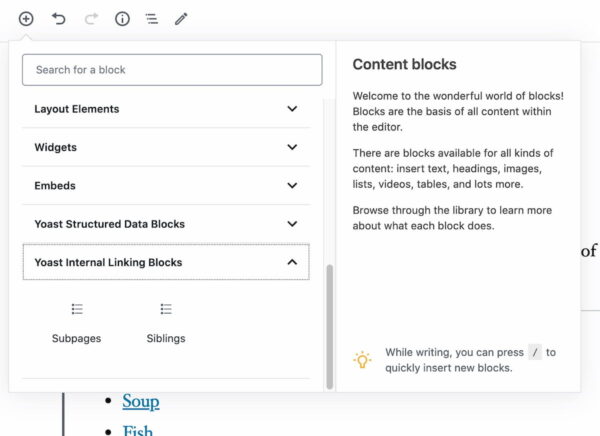
You can find the new Yoast Internal Linking Blocks in the block editor
The new blocks in Yoast SEO 14.5 are very easy to use and basically do what they say on the tin. The Subpages block lists all the subpages that have that particular page as a parent. So, if I have a page about Italian food, I might have subpages like this:
Italian food
Pasta
Pizza
Soup
Bread
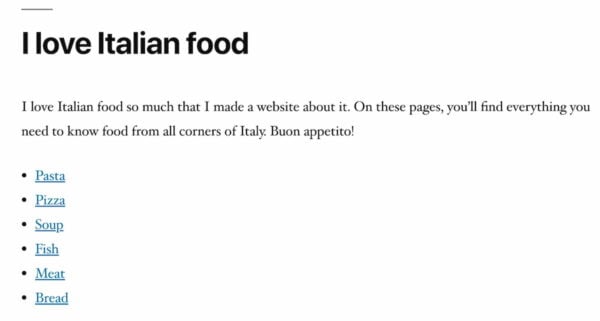
Adding the Subpages block to the page, automatically presents all these subpages in a neat list.
The Subpages automatically lists the subpages that have the Italian food page as a parent
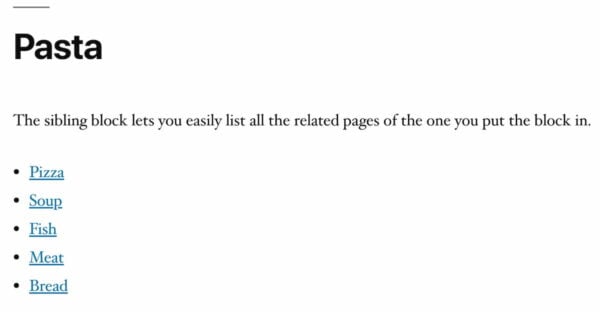
You can add the Siblings block to any of the subpages to list the siblings of the page you’ve added it to. So, if you add it to the pasta page, it’ll automatically list the related pages, in this case pizza and soup.
The Siblings block automatically a list with links to the other siblings of the Italian food parent page
Now, you can link all hierarchically related content by simply adding a block! The blocks only work on hierarchical pages, not on blog posts.
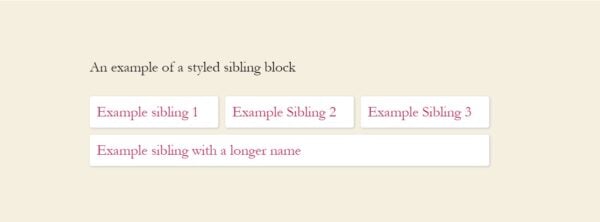
While the blocks in their naked form might seem a bit awkward for some purposes, you can style them with CSS to your hearts content. For instance, by using a bit of additional CSS you can turn them into something like this:
A bit of CSS turns the blocks into an eyecatcher for your site
You don’t need much to come to the above result. For reference, find the CSS below. Remember, you can easily add custom CSS via the theme customizer in WordPress.
With WordPress 5.5, XML sitemaps make their way into WordPress core. Of course, that’s good news for the web. Together with Google, we spearheaded the project of bringing XML sitemaps to core and we’re proud that the moment has come that every WordPress site will get an XML sitemap. Now, a large part of the web will be a much friendlier place for crawlers!
As awesome as the core XML sitemaps may be, we’ve decided to disable these for Yoast SEO users and we’re continuing to use our own XML sitemaps. Our XML sitemaps are more sophisticated, integrated, and automated, that’s why we decided to disable the core WordPress XML sitemap for our users.
In Yoast SEO 14.5, Premium users can enjoy two new blocks for the block editor: the Subpages and Siblings blocks. These can help improve internal linking for hierarchical pages. They are extremely easy to use, but powerful!
We’ve also chosen to continue to use our own XML sitemaps over those in WordPress 5.5 as ours are fully developed, fast and flexible. We think these’ll serve your site best.
June 13 - 15, 2024
Team Yoast is at Attending, Organizing, Sponsoring, Volunteering WordCamp Europe 2024! Click through to see who will be there, what we will do, and more!
See where you can find us next »
23 May 2024
Learn how to start your SEO journey the right way with our free webinar. Get practical tips and answers to all your questions in the live Q&A!
All Yoast SEO webinars »
22 Responses to Yoast SEO 14.5: New internal linking blocks for Premium
Andrew • 4 years ago
Will the content automatically update if sub/sibling pages are renamed, added, or removed?
Camille Cunningham • 4 years ago
Hi there Andrew, good question! The answer is yes, they will be automatically updated when you rename, remove, or add pages :)
Faz Music • 4 years ago
Yoast is the best seo plugin !
Camille Cunningham • 4 years ago
Thank you!!
oliviaherlihy • 4 years ago
My Yoast is showing as 14.5 but the new blocks are not showing in the block editor?? I’m a premium member
^ Post author
Edwin Toonen • 4 years ago
Hi Olivia. Have you added them to pages with subpages attached to them? They only work on hierarchical pages, so not on blog posts. If you still can’t see them, please contact our support team.
Rahul Sharma • 4 years ago
New internal linking system is sounds something new to me.
great post
Thanks.
^ Post author
Edwin Toonen • 4 years ago
You’re welcome, Rahul!
Jochen Gererstorfer • 4 years ago
It is generating empty lines and duplicate lines for me.
I think the duplicate lines come from renamed or redirected pages.
See: share.getcloudapp.com/8Lu7lxL5
Willemien Hallebeek • 4 years ago
Hi Jochen, that’s strange behaviour. Sorry for the inconvenience and thanks for letting us know! Could you please send an email to our Support engineers (support@yoast.com)? They’ll be glad to help!
Mehmet G. • 4 years ago
Hello. ” aria label ‘undefined’ ” was added when I used your nofollow feature to external links. I guess WP has removed the use of the aria label. Because it doesn’t add aria label to my external links for a long time. So “undefined” is being added with your nofollow feature. Has this problem been resolved with this release?
Willemien Hallebeek • 4 years ago
Hi Mehmet, thanks for letting us know! We’re looking into it at the moment. We will let you know the outcome.
p75p9x8d34fm • 4 years ago
The new blocks are not showing on my end. I have premium and its updated.
^ Post author
Edwin Toonen • 4 years ago
Hi! Hmm, strange. Are you trying to add the blocks to blog posts maybe? These only work on pages with subpages attached to them.
Laurence Norah • 4 years ago
Is their a timeframe for when the sitemap functionality is going to work with the new indexables capability of Yoast? My experience is that sitemaps take a (relatively) long time to generate, especially on image heavy sites.
^ Post author
Edwin Toonen • 4 years ago
No timeframe yet, Laurence, sorry!
Okoth • 4 years ago
Good to hear that you disabled the core XML sitemaps. Maybe later there can be an option to let us choose which of the two we want to use.
^ Post author
Edwin Toonen • 4 years ago
Hi Okoth. For the time being, we’re going to use our own. We’re actively working on making them even better.
Kenny Williamson • 4 years ago
does this sibling only work on pages? or posts as well?
the other thing is, i seem to recall google hitting a provider that used to use this type of linking previously (sitesell package- think they now also do wordpress setup). But for the life of me i cannot remember exactly why. I would assume that you would also want to link upwards on the subpage, back to the “index” page.
^ Post author
Edwin Toonen • 4 years ago
Hi Kenny. The blocks only work on hierarchical pages, so not on blog posts. I’m not sure what you’re hinting at with the Google penalty. Would be interesting to know more if you can find it.
lavli • 4 years ago
Edwin Toonen is a great author. He writes very well
Camille Cunningham • 4 years ago
Thanks Lavli, I’ll pass your compliment on to Edwin :)





Will the content automatically update if sub/sibling pages are renamed, added, or removed?
Hi there Andrew, good question! The answer is yes, they will be automatically updated when you rename, remove, or add pages :)
Yoast is the best seo plugin !
Thank you!!
My Yoast is showing as 14.5 but the new blocks are not showing in the block editor?? I’m a premium member
Hi Olivia. Have you added them to pages with subpages attached to them? They only work on hierarchical pages, so not on blog posts. If you still can’t see them, please contact our support team.
New internal linking system is sounds something new to me.
great post
Thanks.
You’re welcome, Rahul!
It is generating empty lines and duplicate lines for me.
I think the duplicate lines come from renamed or redirected pages.
See: share.getcloudapp.com/8Lu7lxL5
Hi Jochen, that’s strange behaviour. Sorry for the inconvenience and thanks for letting us know! Could you please send an email to our Support engineers (support@yoast.com)? They’ll be glad to help!
Hello. ” aria label ‘undefined’ ” was added when I used your nofollow feature to external links. I guess WP has removed the use of the aria label. Because it doesn’t add aria label to my external links for a long time. So “undefined” is being added with your nofollow feature. Has this problem been resolved with this release?
Hi Mehmet, thanks for letting us know! We’re looking into it at the moment. We will let you know the outcome.
The new blocks are not showing on my end. I have premium and its updated.
Hi! Hmm, strange. Are you trying to add the blocks to blog posts maybe? These only work on pages with subpages attached to them.
Is their a timeframe for when the sitemap functionality is going to work with the new indexables capability of Yoast? My experience is that sitemaps take a (relatively) long time to generate, especially on image heavy sites.
No timeframe yet, Laurence, sorry!
Good to hear that you disabled the core XML sitemaps. Maybe later there can be an option to let us choose which of the two we want to use.
Hi Okoth. For the time being, we’re going to use our own. We’re actively working on making them even better.
does this sibling only work on pages? or posts as well?
the other thing is, i seem to recall google hitting a provider that used to use this type of linking previously (sitesell package- think they now also do wordpress setup). But for the life of me i cannot remember exactly why. I would assume that you would also want to link upwards on the subpage, back to the “index” page.
Hi Kenny. The blocks only work on hierarchical pages, so not on blog posts. I’m not sure what you’re hinting at with the Google penalty. Would be interesting to know more if you can find it.
Edwin Toonen is a great author. He writes very well
Thanks Lavli, I’ll pass your compliment on to Edwin :)